
Lightup Data Observability
Monitor, Detect, and Resolve Data Quality Issues Before They Impact Business.
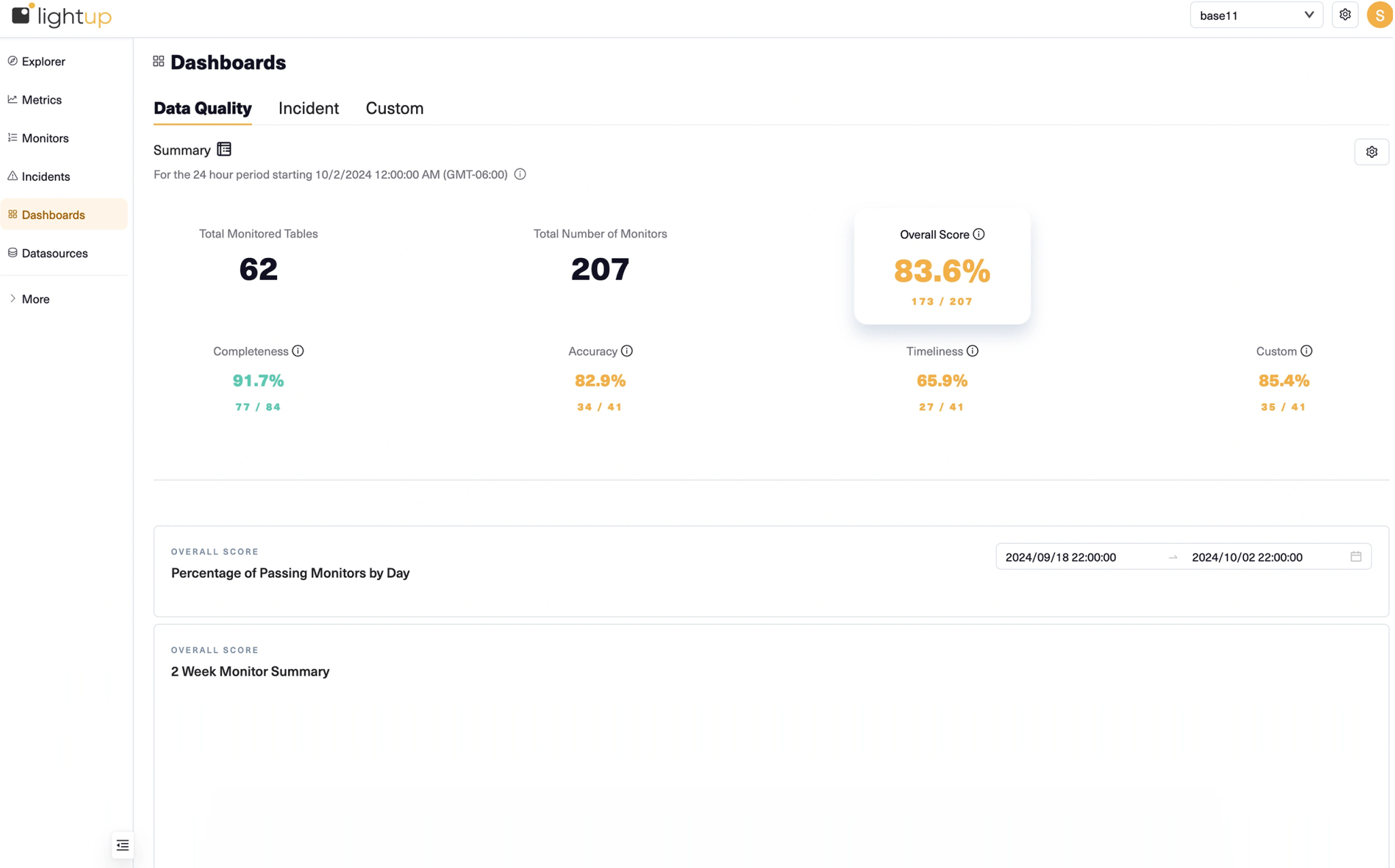
Ensure reliable data for business-critical analytics and AI workloads across cloud, hybrid, and on-premises systems by proactively monitoring data health with automated Data Quality checks, AI-driven anomaly detection, and real-time incident alerts.
> curl -sL https://raw.githubusercontent.com/lightup-data/lightup/main/setup.sh | bash -s -- claude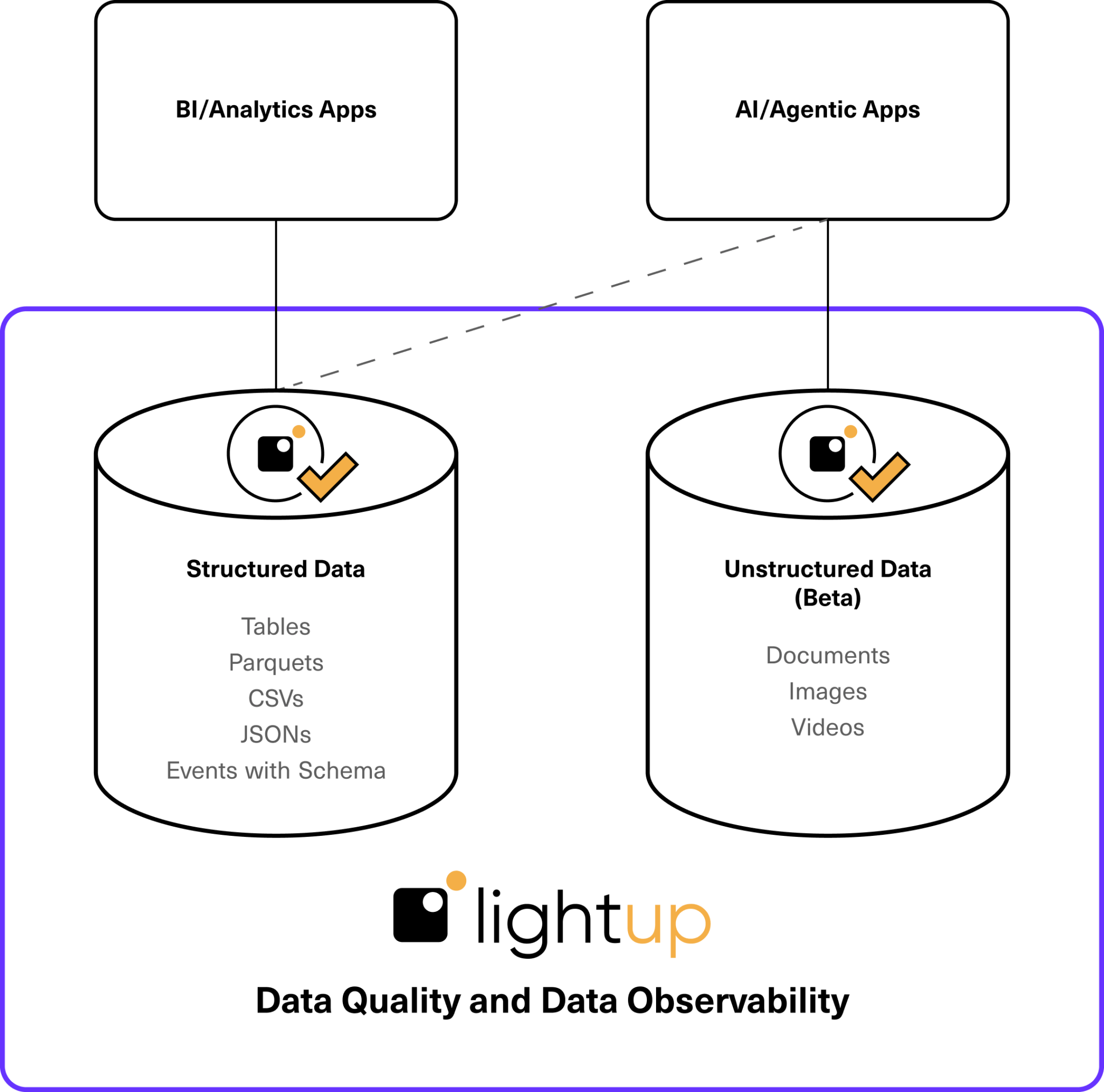
Data Quality and Data Observability for Structured and Unstructured Data
Whether monitoring structured tabular data for business intelligence (BI) and analytics, or unstructured data in documents for GenAI and LLM applications, Lightup’s Data Quality and Observability solutions are best for enterprises focused on:
- Automating and scaling business-oriented data validations to eliminate inefficient manual processes.
- Accelerating their data journey by migrating from legacy solutions to a modern Data Quality and Observability platform.
- Democratizing Data Quality by removing technical barriers to ensure successful enterprise adoption.
Data Quality Automation, Within Your Control.
Plug-and-go automated Data Quality solutions may improve some data issues quickly and easily. The reality? Some of the top Data Quality vendors rely on black box systems that lack the flexibility and control required to create business-driven Data Quality rules, aligned with your business processes.
If you’re serious about solving enterprise Data Quality issues at scale, you’ll need a flexible system like Lightup with zero-config metrics, a no-code rule builder, and a full SQL interface for custom checks with complex business logic.
Powered by AI, Lightup Data Quality and Observability keeps up with your evolving business processes and data models, offering copilot control and flexibility to modify on the fly.

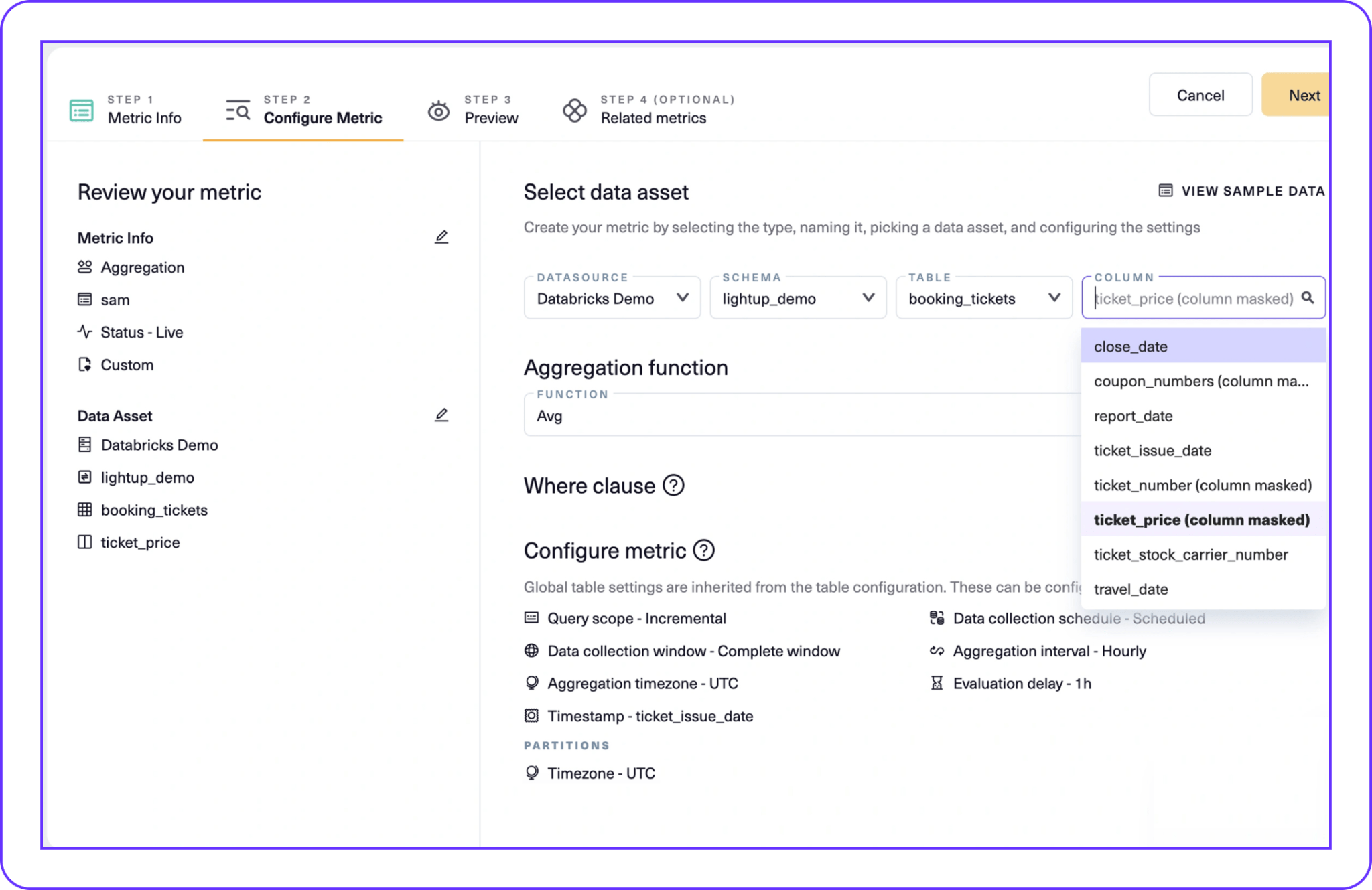
Enable Self-Service Data Quality with the No-Code Rule Builder.
Plug-and-go automated Data Quality solutions may improve some data issues quickly and easily, but some vendors rely on black box systems that lack flexibility. Lightup’s no-code rule builder puts control in the hands of every team:
- Empower non-technical users with a no-code UI.
- Scale prebuilt checks in minutes, not months.
- Create complex, business-specific checks.
- Streamline cross-departmental collaboration.
Find Data Outliers with AI-Based Anomaly Detection Monitors.
Monitor and detect out-of-bounds metrics, triggering Incidents automatically the moment something goes wrong:
- Monitor and detect out-of-bounds metrics, triggering Incidents in Lightup.
- Train Anomaly Detection models on historical data in minutes, not weeks.
- Add supervised training to Anomaly Detection models to fine-tune accuracy.
- Adjust detection settings, preview rules, and backtest for criteria configuration.
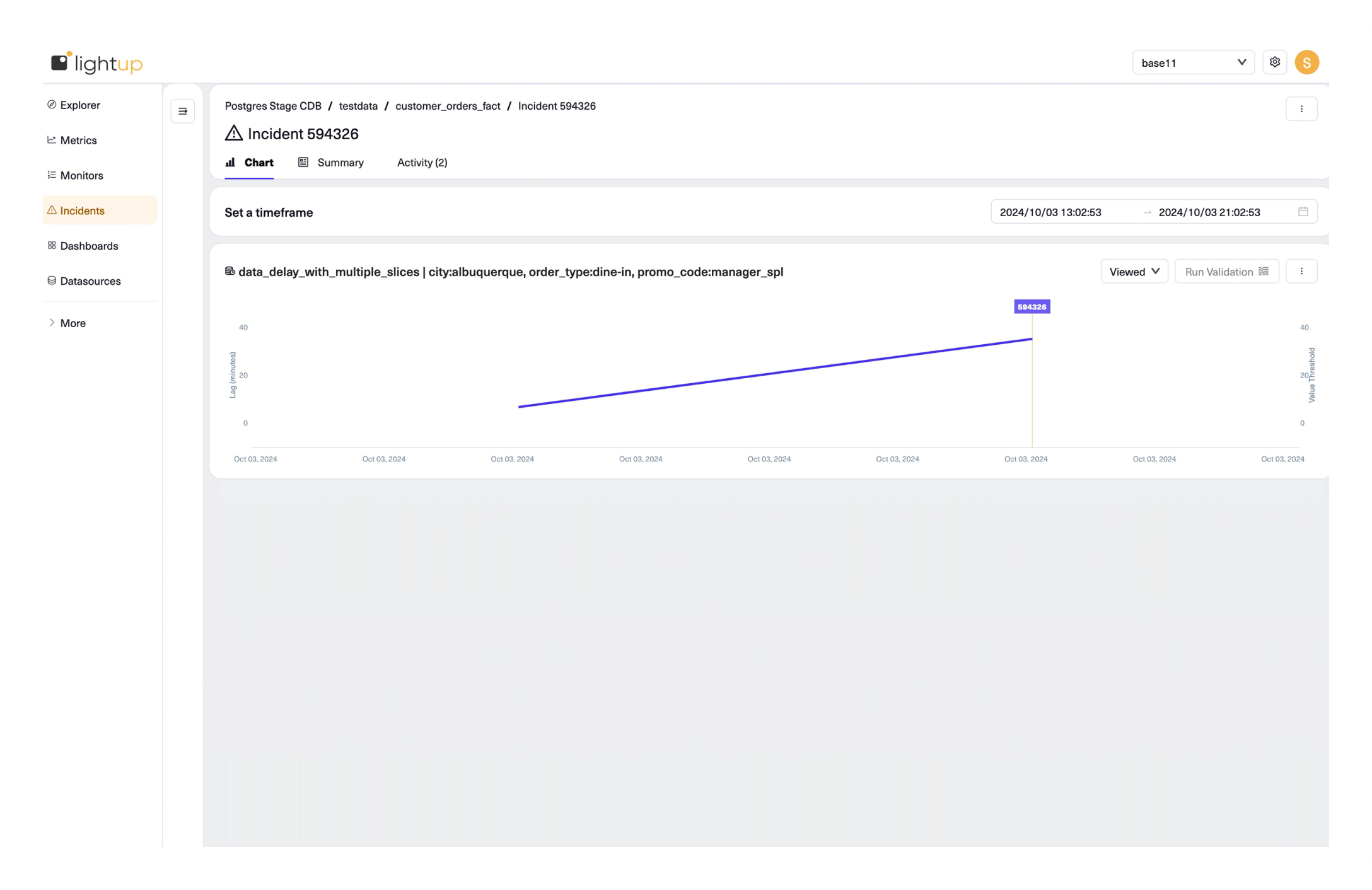
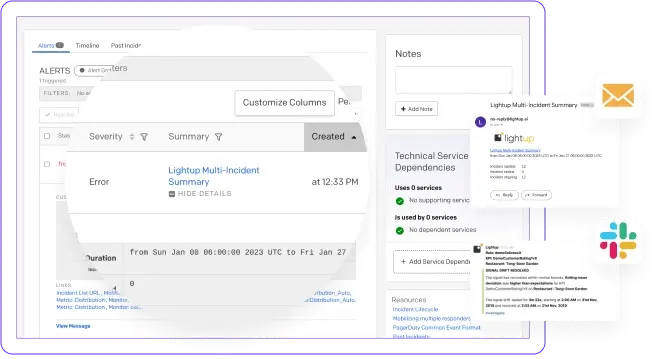
Know When Data Breaks, Before People Complain, with Realtime Alerts.
Get Data Quality incident alerts through email, Slack, PagerDuty, MS Teams, and more — the moment an issue is detected:
- Get Data Quality incident alerts through email, Slack, PagerDuty, MS Teams, and more.
- Drill into linked Data Quality Incidents for detailed analysis and further investigation.
- Reduce MTTA for critical incidents to resolve issues before downstream escalation.
Key Benefits
Customize Deep Data Checks
Deploy basic to complex custom deep Data Quality checks with business-specific requirements on actual data content, not just metadata.
Democratize Data Quality
Democratize no-code Data Quality checks to enable business users to write their own checks — without relying on engineers or learning a proprietary rule engine.

Scale Across Enterprise Data
Scale Data Quality checks across huge data volumes with Lightup's efficient pushdown SQL queries, without choking system performance.
Increase Productivity
Replace legacy manual checks with prebuilt automated checks, accelerating rule authoring workflows for higher productivity.
Data Quality and Observability Success Framework
Enterprise-First with Personalized Service
At Lightup, we understand the unique challenges and complexities of implementing Data Quality and Observability at enterprise scale. By partnering closely with Fortune 500 companies, we've optimized our enterprise-first delivery framework, team structure, and processes to make you successful from day one.
A Team Sport
Data Quality and Data Observability is a team sport, and we democratize our approach to ensure everyone has a seat at the table.
Deep, Business-Aligned Metrics
We believe Data Quality and Observability requires deep metrics, aligned with your business process — there's no one-size-fits-all solution.
Personalized Professional Services
We know enterprise environments have distinct requirements, and we're committed to exceeding your expectations with personalized professional services that expand based on your needs.
Frequently Asked Questions
Both. Lightup includes Data Observability Checks (DO) and Data Quality Monitoring (DQ).
- Data Observability Checks (aka ‘metadata checks’) observe pipelines — providing metrics such as data timeliness, accuracy of data volumes written to tables, and more.
- Data Quality Monitoring is based on Deep Data Checks that query the actual data, not just metadata — catching issues like duplicated data that observability checks alone would miss.
Lightup’s Deep Data Checks push SQL queries down to your tables to detect the exact problem, without moving or copying data.
Yes, Lightup provides a summary report of Failing Records, customizable to your specific needs.
- View problematic records and see how to find them in your data source.
- Use Failing Records with Lightup’s Data Reconciliation Checks to see exactly where data drifted from expectations.
Lightup’s automation is enough to get everyone started.
- Data Profiling and Metadata Metrics are available out-of-the-box with no configuration.
- Auto Metrics offer deeper data insights with minimal configuration.
- No-code and low-code Data Quality Checks enable scalable workloads without solely relying on data engineering teams — democratizing Data Quality for analysts, data stewards, and business users.
A Lightup Workspace is a way to segment users and departments into different groups with their respective data assets.
- Categorize Workspaces by data domain, department, team, or use case.
- All Data Quality metrics, monitors, alerts, and integrations are unique to the Workspace, with user-assigned roles and permissions.
Find hidden bad data, before stakeholders report it.
Deliver reliable data across enterprise analytics and AI workloads with Lightup Data Quality and Data Observability solutions.