


The AI Era Needs Data Quality for Unstructured Data, Starting With Documents
More than 80% of enterprise data is unstructured — but traditional Data Quality tools are designed to run checks or queries on structured data in databases and data warehouses.
That means many enterprises aren’t leveraging unstructured data in critical documents that power operations, analytics, compliance, and customer experience, such as:
- Financial reports with updated numbers.
- Product documentation scattered across folders or document repositories.
- Customer support knowledge bases that need constant updating.
Even small changes in these documents can introduce inaccuracy, inconsistency, or incompleteness — and in some cases, even PII contamination. Unfortunately, monitoring the quality of document data isn’t possible with traditional Data Quality tools and has been challenging to operationalize at enterprise scale.
That’s where Lightup Data Quality for Unstructured Data comes in.
Why Is Managing Unstructured Data Quality So Challenging?
Documents are a prime example of unstructured data containing enterprise insights and valuable information that can be used to drive business decisions and train AI/LLM models.
Yet, documents are typically manually managed, difficult to monitor for quality, and error-prone — making them problematic for training LLM models or decision-making.
Unstructured data is everywhere, including:
- PDFs of financial reports
- DOCX files for legal, HR, or product documentation
- Plain text or markdown (.txt, .md) files for notes
- Email archives
- Internal wikis and knowledge bases
- Files stored in cloud repositories like Amazon S3, Google Drive, OneDrive, or Box
Managing unstructured Data Quality for documents is difficult to track at scale due to:
- The varying structural differences between files and document types.
- The nature of key facts being embedded in free text, not schema-defined fields.
- Untracked or unmonitored changes within the content.
- Quality issues like missing information, factual inconsistencies, or exposed PII.
Yet, unstructured data can hold essential enterprise context and operational knowledge. Financial numbers, compliance clauses, invoices, customer feedback, product information, and more all live in documents. Regressions or errors of omission in documents often go unnoticed, leading to potential downstream risks.
The Value of Training AI/LLM Models with Unstructured Document Data
As organizations accelerate AI adoption, they’re realizing that some of the most valuable training data already exists inside their enterprise documents. Unlike structured databases, documents often contain rich context, domain-specific information, and operational nuances — exactly the kind of company-specific information that AI models and LLMs need to be truly useful.
Enterprise documents:
- Capture core institutional knowledge with contextual details often missing from databases.
- Include everyday language and terminology used by employees, partners, and customers.
- Are the primary format for business decisions, compliance, and communication.
3 Enterprise Use Cases
Training Domain-Specific LLMs: Enterprises fine-tune foundational AI models using internal documents — technical manuals, customer support FAQs, policy documents — to improve accuracy in industry-specific tasks.
Retrieval-Augmented Generation (RAG) Systems: RAG architectures use enterprise documents as a knowledge base that models can reference at runtime, generating contextually correct, up-to-date responses.
Automated Document Intelligence: AI models extract structured information from contracts, financial reports, or onboarding documents — automating workflows like risk scoring, revenue forecasting, and compliance checks at scale.
Simply put, maintaining high-quality enterprise documents becomes a prerequisite. If your AI is learning from or referencing documents, you need confidence that the information is accurate, complete, and consistent.
Getting Started with Lightup’s Unstructured Data Quality
Getting started in Lightup is as simple as connecting an unstructured data source:
- Navigate to the Lightup Explorer panel, now with a dedicated tab for unstructured data sources.
- Connect an unstructured data source, such as Amazon S3.
- Enable the Unstructured Data toggle to indicate that folder contents should be profiled.
- Lightup creates a directory tree of files and folders within the S3 bucket.
Supported file types: PDF, .txt, .md (more coming soon)
Watch the full feature walkthrough in the webinar replay
AI-Powered Document Profiling
After connecting your unstructured data source and enabling Data Profiling, Lightup automatically generates an AI-powered summary of facts that includes:
- Document metadata (type, length, creation date)
- Summary of the content
- 5 autogenerated questions and answers highlighting salient document facts
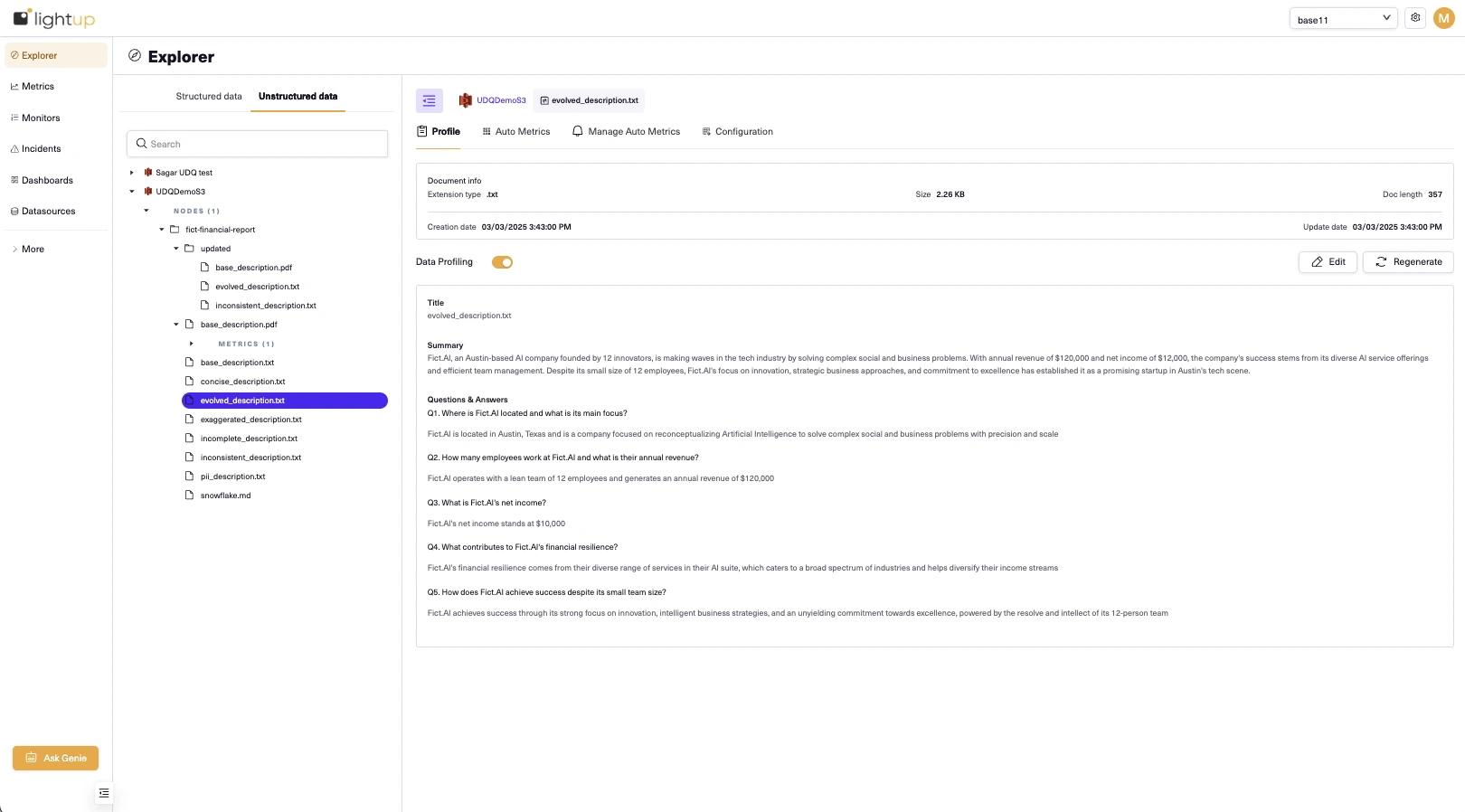
Editable Profiles
Review the data profile for the document, and if it needs adjusting, you can:
- Click “Regenerate” to create a new version of the profile.
- Manually edit to add or delete Q&As based on domain knowledge and context.
- Save updated profiles for monitoring.
Since AI is non-deterministic by nature, each regenerated profile may offer a different perspective.
Auto Metrics for Documents and Folders
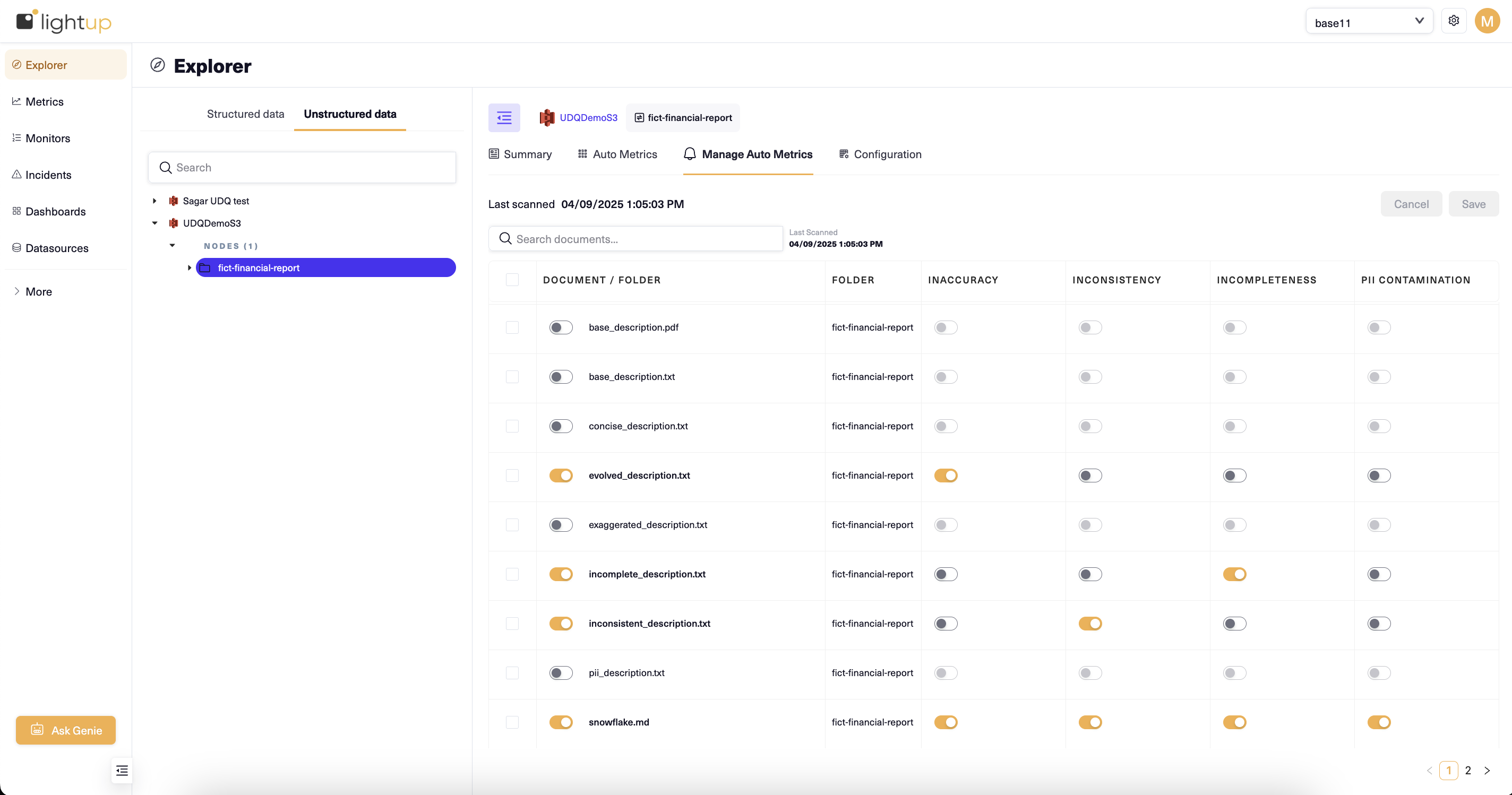
Once a data profile is activated, Lightup enables document- and folder-level Auto Metrics for continuous observability. Lightup provides out-of-the-box coverage for the four primary dimensions of Data Quality for documents:
- Inaccuracy
- Inconsistency
- Incompleteness
- PII Contamination
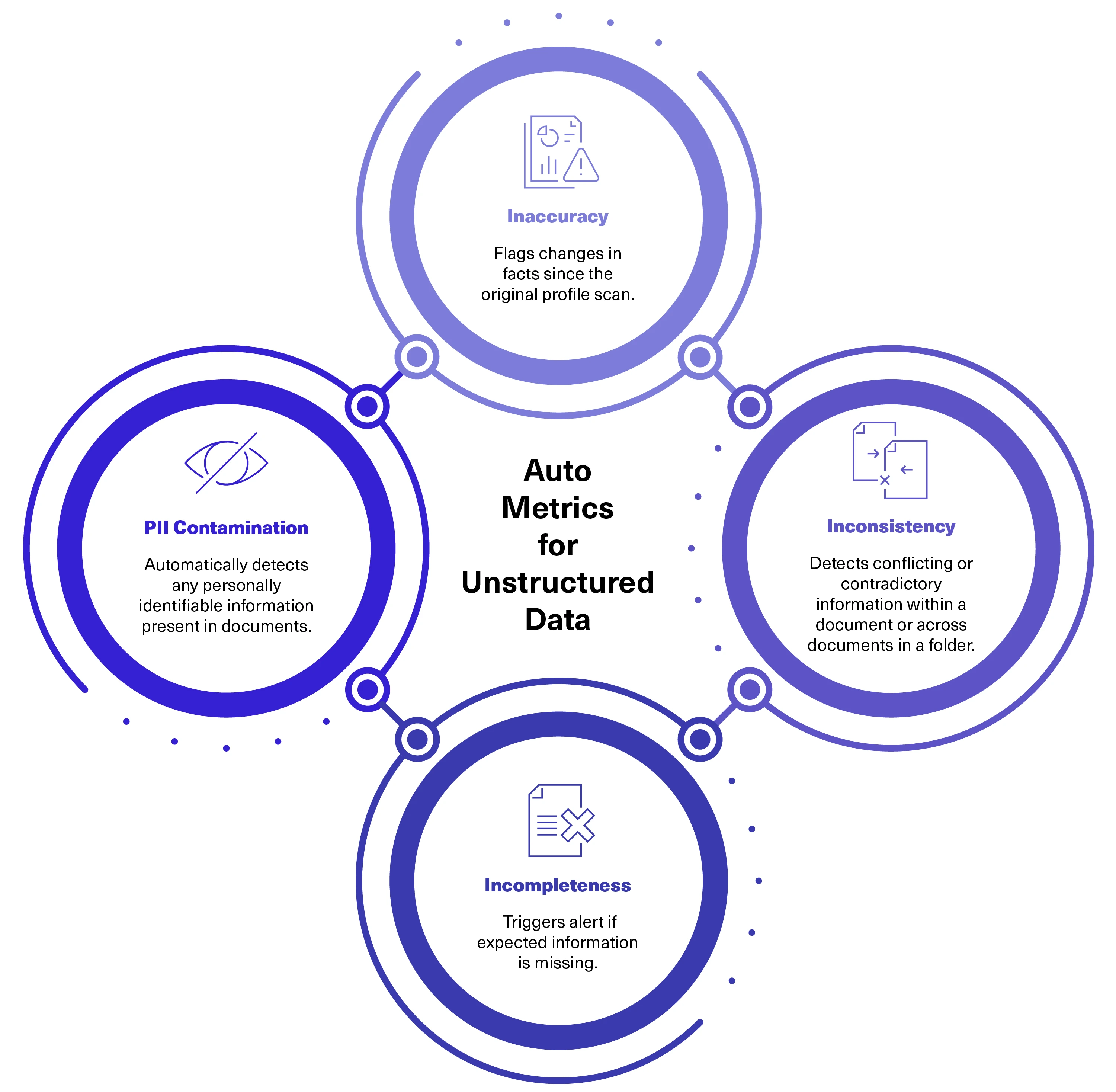
Document-Level Metrics
Inaccuracy: Flags changes in factual data (e.g., revenue changed from $1M to $1.2M).
Inconsistency: Detects contradictions within the document and presents a side-by-side comparison of conflicting information.
Incompleteness: Identifies missing information from the original Q&As and indicates factual gaps or degradations over time.
PII Contamination: Detects and lists instances of PII, providing the count and examples of detected PII fields.
Folder-Level Metrics
Inconsistency Across Documents: Analyzes multiple files in a folder for conflicting information and surfaces contradictions between versions or documents.
Custom Metrics
When you’re ready to go beyond Auto Metrics, Lightup also supports Custom Metrics to extract domain-specific facts from documents using natural language prompts. For example, to track net income from a financial report:
- Navigate to the unstructured data source, then right-click to select Create Metric.
- Define schema (e.g., Value: Income, Type: Number).
- Create a metric using natural language, such as “Extract net income from financial report.”
- Schedule metric collection runs to trigger document scans.
- Activate monitors to track the output, enable Anomaly Detection, and define preferred alert channels.
Anomaly Detection and Alerting
Anomaly Detection tracks trends over time and alerts you if quality signals change. For example, if you typically see 4–5 inaccuracies for a particular document and suddenly get 10, Lightup flags that incident and notifies your team.
Role-Based Access Control (RBAC)
Security still applies to unstructured data sources with Lightup’s enterprise-grade RBAC framework:
- Users only see metrics, profiles, or PII Contamination if authorized.
- Sensitive documents are monitored securely for compliance.
Explore Our Open Source Project
Since we believe AI-ready documents should be accessible to everyone, we’re happy to share a Python library for assessing unstructured Data Quality, available on GitHub as an open source project.
- Connect an LLM and S3 bucket to your project.
- Use our open source code library to evaluate the accuracy and reliability of documents, including PDFs, text files, and markdowns.
- Run computational checks: Inconsistency, Incompleteness, Inaccuracy, and PII contamination.
Questions? Reach out at info@lightup.ai