


What is data remediation and how does Lightup help simplify data remediation processes through automation?
Data remediation is the systematic process of identifying and rectifying Data Quality issues that arise within a dataset. Lightup helps automate data remediation processes by offering an easy way for enterprise data teams to identify, analyze, and fix data issues at scale. These issues may include anything that compromises the integrity and usability of the data, such as:
- Empty values or nulls
- Incorrect formats
- Inconsistent or wrong values
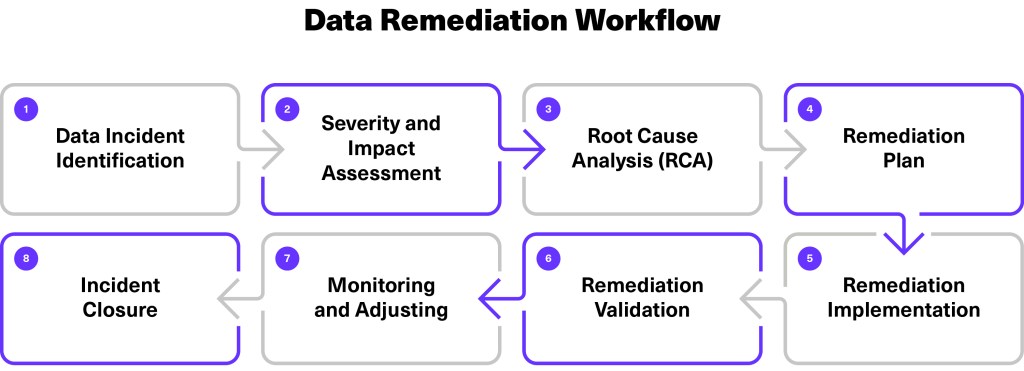
To address these challenges and maintain Data Quality standards, organizations implement a data remediation strategy that outlines an end-to-end process, including eight workflow steps:
- Data incident identification
- Severity and impact assessment
- Root cause analysis (RCA)
- Remediation plan
- Remediation implementation
- Remediation validation
- Monitoring and adjusting
- Incident closure
Key Use Cases
Data Quality Management Address data discrepancies and maintain data integrity across various datasets.
Compliance and Regulation Ensure compliance with data protection regulations by rectifying data issues promptly.
Operational Efficiency Streamline data remediation processes to improve operational efficiency and reduce downtime.
How Lightup Automates Data Remediation
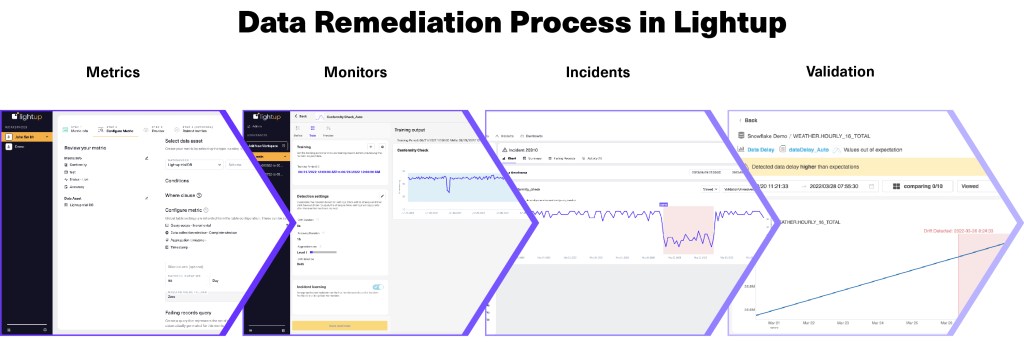
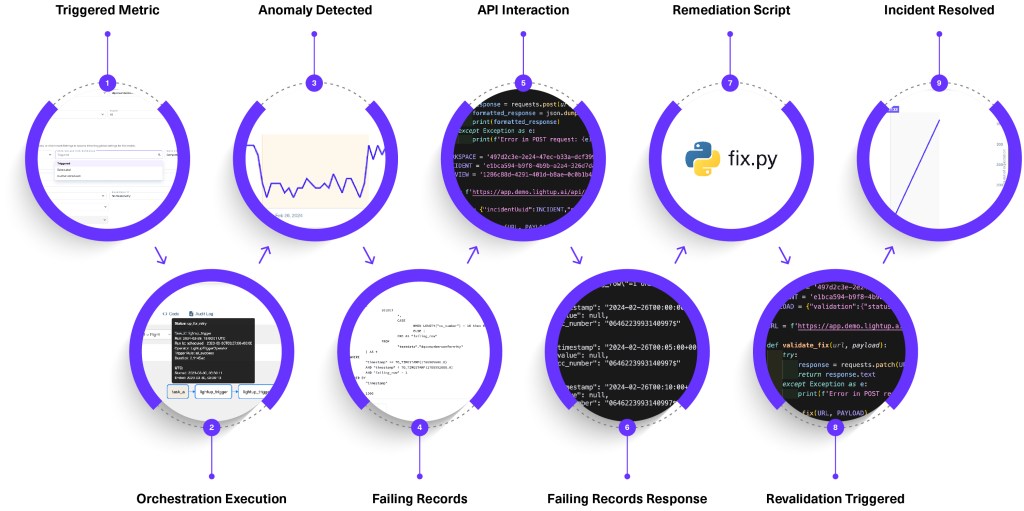
One common Data Quality issue is dealing with columns with empty or null values — for example, a date of birth field left empty because it wasn’t required in an online form. Here’s how Lightup remediates recurring Data Quality issues like empty or null values through automation.
Detection and Alerting
Lightup performs checks to identify null or empty values and other anomalies within a dataset. Upon detection, Lightup alerts stakeholders about the data incident, signaling the need for remediation.
Root Cause Analysis (RCA)
Once missing values and other data incidents are confirmed, your data team needs to determine why the values are missing. This involves investigating potential causes such as database errors, API failures, missing data transformation rules, or other issues in the pipeline.
Lightup provides insights that help identify the cause of the missing values. Once the root cause is identified, the team creates a remediation plan to address the underlying issue.
Remediation Implementation
After the remediation plan has been created and approved, the data team takes action. For example, they might implement new transformation rules, modify the database schema to set default values, or fix the data source to prevent future missing values.
Monitoring and Validation
The final step involves monitoring the data to ensure that remediation efforts are successful. Lightup continuously monitors the data to verify that the null values have been resolved and that the Data Quality check passes. This ensures that the data remains fit for purpose going forward.
Learn how Lightup can automate your data remediation process →